





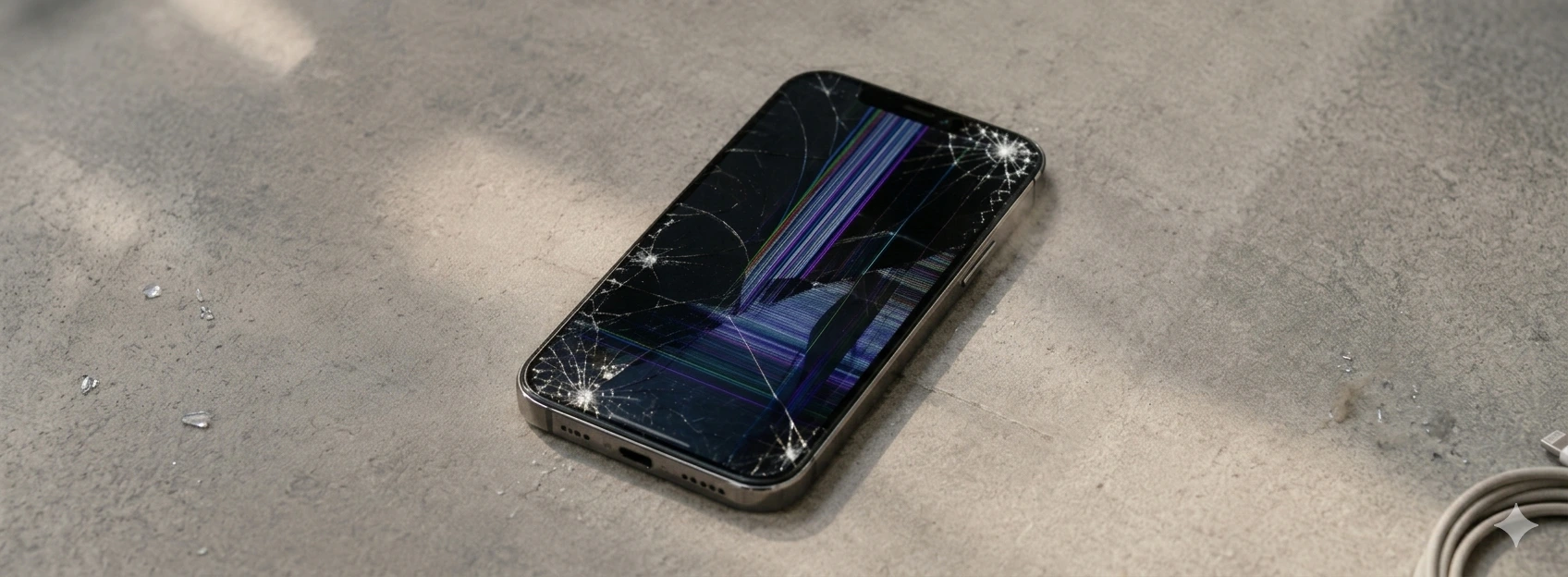




Spots on the iPhone screen: causes and solutions
If you own an iPhone, from the X model to the latest iPhone 17 Pro Max, it's possible you've noticed spots on the screen that impair viewing and the user experience. These spots can arise for various reasons, affecting your phone's performance and aesthetics. At iServices, we understand the importance of a clean and functional screen, which is why we present a complete guide to help you understand the origin of this problem and how you can solve it.
Spots on the iPhone screen are not just a visual nuisance; they can indicate more serious problems that, if left untreated, could compromise the device's functionality. From hardware-related issues to damage caused by liquids or dirt, it is essential to identify the cause to apply the appropriate solution. In this article, we detail the most common causes, practical solutions, and when you should consult our specialized technicians.
Whatever your model, iPhone X, iPhone 11, iPhone 12, iPhone 13, iPhone 14, iPhone 15, or the brand new iPhone 17 Pro Max, our team is ready to help you resolve screen spots with the highest quality and warranty.
Causes of iPhone Screen Spots
Humidity or Liquid Damage
Exposure of the iPhone to humidity or liquids is one of the most frequent causes of screen spots. When water or another liquid penetrates the screen's interior, it can cause discoloration, whitish or yellow spots, and, in more severe cases, display failures.
Physical Screen Damage
Falls or impacts can cause internal screen damage, even if the outer glass appears intact. This damage includes spots caused by damaged liquid crystals, which manifest as dark or distorted areas on the screen.
Coloration Issues or Manufacturing Defect
In some cases, screen spots can result from manufacturing problems or defects related to the bonding of the screen panel. These defects can appear over time and are common in older models or after poorly executed repairs.
Dirt and Residues on the Screen Surface
Surface spots can also be caused by dirt, natural hand oils, or residues from inappropriate cleaning products. Although easier to remove, they can be mistaken for more serious internal spots.
Solutions Table
| Cause | Recommended Solution | Complexity |
|---|---|---|
| Dirt and residues on the screen | Careful cleaning with specific products | Low |
| Coloration/manufacturing problems | Diagnosis and possible screen replacement | Medium |
| Humidity or liquid damage | Specialized drying and, if necessary, screen repair | High |
| Physical screen damage | Complete screen replacement | Very High |
Step-by-Step Solutions
Careful Screen Cleaning
- 1. Turn off your phone to prevent any additional damage.
- 2. Use a clean, dry microfiber cloth to remove dust and dirt.
- 3. If necessary, apply a small amount of screen-specific cleaning product to the cloth (never directly to the screen).
- 4. Gently wipe in circular motions until surface spots are removed.
- 5. Turn on your phone and check if the spots have disappeared.
Diagnosis and Screen Replacement for Manufacturing Problems
- 1. Schedule a visit to an iServices store for a free diagnosis.
- 2. Technicians will analyze the screen and confirm whether the problem is internal or manufacturing-related.
- 3. If necessary, we will proceed with the screen replacement using original parts.
- 4. The service includes a warranty and quality tests before returning the iPhone.
Drying and Repair after Liquid Damage
- 1. Avoid turning on your phone if you suspect liquid contact.
- 2. Take the device quickly to an iServices store for evaluation.
- 3. Technicians will perform specialized internal drying and equipment cleaning.
- 4. If the screen is damaged, we will indicate the necessary replacement.
- 5. Receive your iPhone with warranty and full functionality.
Screen Replacement after Physical Damage
- 1. Bring your iPhone to an iServices store for immediate evaluation.
- 2. Technicians will confirm the condition of the screen and internal components.
- 3. The screen replacement will be performed with original parts and professional equipment.
- 4. After the repair, the phone will be tested to ensure perfect functionality.
- 5. Ensure peace of mind with our post-repair warranty.
Why do spots appear on my iPhone screen even without falls or liquid contact?
Spots can arise due to internal defects, such as coloration problems or LCD panel failures, even without apparent external causes. They can also result from natural wear and tear or manufacturing imperfections, especially in older models.
Can I clean internal screen spots with household products?
No, internal spots cannot be removed with superficial cleaning. Household products can further damage the screen. For internal spots, it is ideal to seek specialized technical assistance for diagnosis and repair.
How long does screen repair for spots take at iServices?
At iServices, we offer express delivery, and in many cases, screen repair can be done on the same day, depending on the model and complexity. We recommend booking in advance to ensure immediate availability.
My iPhone has screen spots after a software update, what should I do?
Spots after software updates are rare and usually indicate a physical problem, not related to the software. We recommend turning off the device and performing a diagnosis with us to identify the real cause.
Need Professional Help? iServices Is Here for You
If you detect spots on your iPhone screen, from the iPhone X to the iPhone 17 Pro Max, do not hesitate to contact iServices for a professional diagnosis and guaranteed repair. With several stores spread out, we provide specialized technical assistance, original parts, and express deliveries so you can have your phone back as new as quickly as possible.
Our team of qualified technicians is ready to welcome you, assess the problem, and offer the best solution, with warranty and full transparency. Visit iservices.pt to locate the nearest store or schedule your appointment. Trust iServices to take care of your iPhone with the highest quality and professionalism. We are here for you!
Recommended Products
View all
 36 Months
 36 Months

€19.95
36 Months
Other Articles
See more
The iPhone camera is shaking and making noise : How to fix
iPhone camera shaking and making noise? Learn about the common causes and how to fix it with iServices, experts in mobile phone repair.
iPhone TrueDepth Camera Error: Causes and Solutions
Fix the TrueDepth camera error on your iPhone with effective solutions. Learn how iServices can help with warranty and technical support.

Os 5 melhores acessórios para o iPhone
Conhece o guia completo da iServices para os melhores acessórios para iPhone. São produtos que potenciam as capacidades do teu Smartphone Apple.