





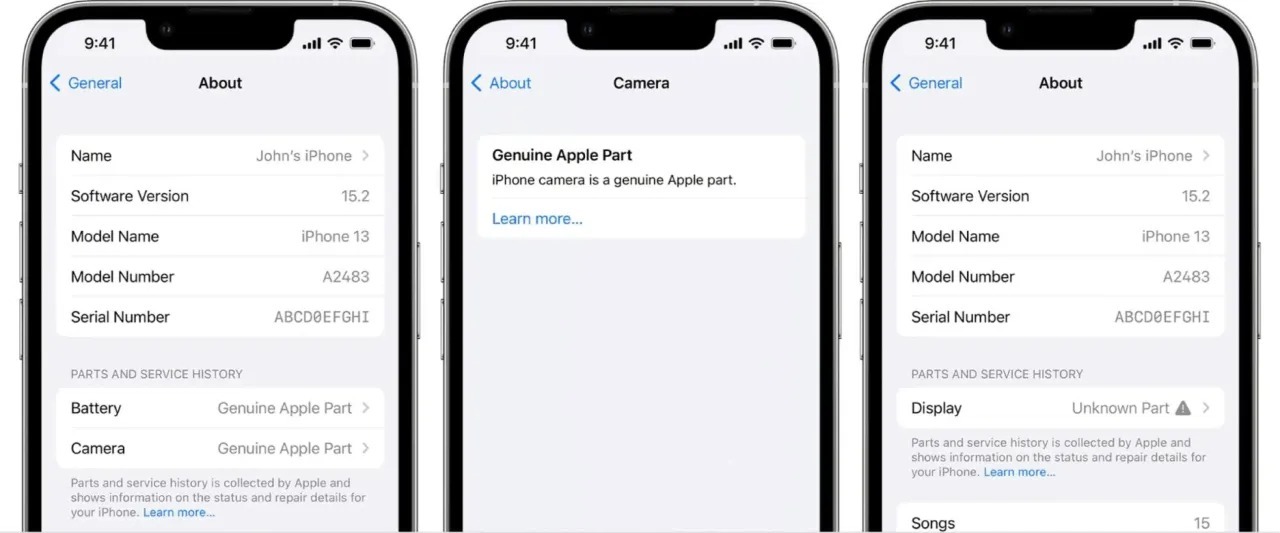




Unknown part in iPhone: how do you fix this?
If you are looking for a way to remove the 'Unknown Part' notification on your iPhone, read on to learn how this notification occurs and how you can resolve it.
What does “unknown part on iPhone” mean?
After an iPhone repair where parts have been replaced, a notification typically appears automatically to check parts such as the battery, camera, or screen. When they are changed, there is a possibility that the iPhone does not recognize the new parts because they are not parts supplied by Apple itself. However, this does not mean that they work less well than the original parts.
If you receive such a warning, you don't need to worry. This is purely for information purposes and does not mean there is a problem with the device or that the current part will affect its performance. This message may remain on your iPhone's lock screen for about 4 days, but will disappear afterwards. This only happens on newer iPhones with the latest OS updates. However, the warning will remain in the device settings.
This warning has no impact on your iPhone at all, as iServices' refurbished iPhones undergo more than 40 tests and all have a battery in perfect condition, always above 80% of maximum capacity.
Battery warning on the iPhone: what should I do?
The warning on your iPhone that the battery is not original can be annoying. But don't worry, the notification will disappear after about 4 days.
How do I remove the warning on an iPhone with a non-original screen?
Unfortunately, it is not possible to remove this notification in iOS. You will therefore have to wait until it disappears from your device.
So whether you want to have your iPhone repaired or want to buy a refurbished iPhone, trust iServices. Choose your favorite model and count on equipment with a 3-year warranty.
Recommended Products
View all
 36 Months
 36 Months

€19.95
36 Months




Other Articles
See more
Is there a foldable iPhone coming in 2026? Everything we know so far
The foldable iPhone could appear in 2026. Discover the rumors, possible features, the design, and what Apple's first foldable smartphone could offer.

New: AirPods Max now available at iServices
The refurbished AirPods Max have just arrived at iServices with a 3-year warranty, tested Apple quality, and at a much more accessible price.
iPhone 18: release date, models and new features
When will the iPhone 18 be released? Discover the release dates of the iPhone 18 Pro, 18 Pro Max and iPhone Duo and what we already know about the new Apple generation.
