





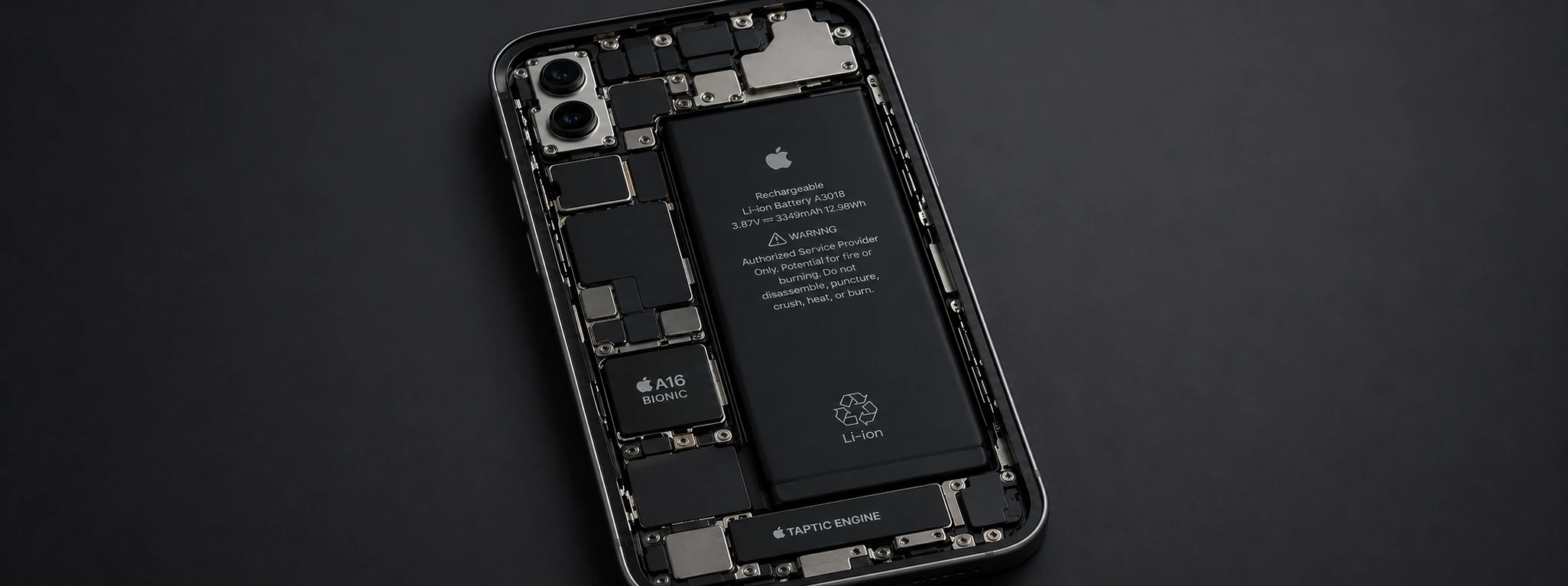




iPhone Battery Health Declining: Causes and Solutions
Your iPhone's battery health is one of the most important factors for ensuring your device's performance and battery life. From the iPhone X to the latest models, such as the iPhone 17 Pro Max, users have reported that the battery loses capacity quickly, negatively impacting their daily experience. At iServices, we understand how frustrating this situation can be, especially when you depend on your phone for work, leisure, and communication.
This article addresses the main causes that lead to the accelerated deterioration of your iPhone's battery health, as well as practical solutions you can apply to prolong its lifespan. If you've noticed that your iPhone drains very quickly or that the battery seems to degrade rapidly, follow us to discover how to solve this problem most effectively.
Causes of iPhone battery draining quickly
Intensive use of apps and background processes
The iPhone can show high battery consumption when several applications are active in the background, consuming processor and network resources. This is common in models from the iPhone X to the latest, especially if you use many social media apps, games, or streaming services, which require greater battery effort.
Defects or natural battery wear
All lithium-ion batteries, including those in iPhones, have a limited lifespan. Over time, the battery's maximum capacity naturally decreases, which causes battery health to drop and battery life to reduce. This wear can be faster if the phone is exposed to extreme temperatures, excessive charging, or frequent deep discharges.
Operating system updates and incompatibilities
Sometimes, iOS updates can cause temporary high battery consumption due to indexing processes or new features that require more resources. In some cases, incompatibilities between operating system versions and iPhone hardware can accelerate battery degradation.
Hardware issues and non-certified chargers
Using non-Apple certified chargers or cables can damage the battery by providing an inadequate current. Additionally, damaged internal components, such as the battery management circuit, can cause battery health to drop quickly, even if it doesn't have high natural wear.
Solutions Table
| Cause | Recommended Solution | Complexity |
|---|---|---|
| Intensive use of background apps | Disable background app refresh and close apps | Low |
| Natural battery wear | Battery replacement by specialized technicians | High |
| Operating system updates | Check and install updates and restart iPhone | Medium |
| Non-certified chargers | Use official Apple chargers and cables | Low |
| Hardware issues | Diagnosis and repair at an iServices store | High |
Step-by-Step Solutions
Disable background app refresh and close apps
- 1. Go to your iPhone's Settings.
- 3. Select General and then Background App Refresh.
- 3. Disable the option for apps you don't need to keep constantly running.
- 4. To close apps, swipe up from the bottom of the screen (or double-click the Home button on models with a physical button) and swipe up the apps you want to close.
Battery replacement by specialized technicians
- 1. Diagnose the battery status via Settings > Battery > Battery Health.
- 2. If the capacity is below 80%, consider replacement.
- 3. Visit an iServices store so our technicians can evaluate and replace the battery with original parts.
- 4. Benefit from the warranty and technical assistance we offer in all stores.
Check and install updates and restart iPhone
- 1. Go to Settings > General > Software Update.
- 3. Install all available updates.
- 3. Restart the iPhone for changes to be applied and temporary processes to be finalized.
Use official Apple chargers and cables
- 1. Avoid generic or non-certified chargers and cables.
- 2. Opt for official Apple or MFi (Made for iPhone) certified accessories.
- 3. If you suspect the charger is causing problems, try a different charger and check if battery health improves over time.
Diagnosis and repair at an iServices store
- 1. If you suspect hardware problems, schedule a visit to an iServices store.
- 2. Our technicians perform a complete diagnosis of your iPhone.
- 3. We propose the best solution, whether it's repairing internal components or replacing the battery.
- 4. We offer warranty and express deliveries so your phone can quickly return to perfect working condition.
Why is my iPhone battery draining so quickly?
The battery may be draining quickly due to natural wear, intensive app usage, operating system updates, or hardware issues. The use of non-certified chargers can also accelerate degradation.
How can I check my iPhone's battery health?
You can check battery health in Settings > Battery > Battery Health. Here you will see the maximum capacity as a percentage and can tell if replacement is recommended.
Is it worth replacing an iPhone battery?
Yes, replacing the battery restores your iPhone's battery life and performance, extending the device's lifespan. At iServices, we perform this replacement with original parts and warranty.
What should I do if my iPhone gets very hot while charging?
Excessive heating can indicate problems with the charger, battery, or internal circuit. We recommend turning off the device, using a certified charger, and, if the problem persists, visiting an iServices store for professional diagnosis.
Need Professional Help? iServices Is Here for You
At iServices, we offer specialized service to diagnose and solve problems related to your iPhone's battery health. With several stores across Europe, we guarantee excellent technical assistance, express deliveries, and original parts for battery replacement.
If your iPhone is losing battery life quickly, don't hesitate to visit one of our stores. Our experienced technicians are ready to help restore your phone's functionality quickly and with a warranty. For more information, visit our website iservices.pt and book your diagnosis with us now. We are here to ensure your iPhone regains healthy battery life and like-new performance.
Recommended Products
View all

 36 Months
 36 Months

€19.95
36 Months




Other Articles
See more
iPhone Action Button is not working: Causes and Solutions
iPhone action button not working? Discover the common causes and effective solutions for models from the iPhone X to the iPhone 17 Pro Max at iServices.
The iPhone camera is shaking and making noise : How to fix
iPhone camera shaking and making noise? Learn about the common causes and how to fix it with iServices, experts in mobile phone repair.
iPhone loses Wi-Fi connection: causes and solutions
Discover how to solve the problem when the iPhone constantly disconnects from the Wi-Fi, with effective solutions for iPhone models.
